

Rather than explain the features of every AI tool used for SEO, I’ve picked out 11 use cases that have helped improve my workflow and get my clients and me better results and organic traffic.
But before I dive in ….
What are AI SEO tools?
AI SEO tools use artificial intelligence, machine learning and natural language processing to do SEO tasks more quickly and effectively than manual methods. These tasks include analysing keywords and search engine results, producing content and providing in-depth SEO reports.
Keep in mind that all these use cases still require manual work; AI can’t do everything for you (yet).

1. Keyword Insights for clustering, content planning & scaling
Save time and effort creating content plans
Deliver a long term actionable content strategy
What is Keyword Insights?
Keyword Insights started as a keyword clustering tool but has since expanded into offering keyword research and content briefs.
I previously used Ahrefs solely for keyword research, but I discovered that the topics I wrote or recommended to clients were generating lots of search impressions but few clicks.
So, I needed to up my keyword research game.
How I use it
When creating a client content strategy, I now use the Keyword Insights keyword clustering tool to group keywords from Ahrefs and Search Console data into a content plan where I can better target topics.
For example, I created a client’s content plan 5 months ago, and I still use that same plan for their monthly content production.
I found the learning curve short and the tool is quick to deliver a clustering report, but you still need to use your experience and SERP analysis to understand intent, write a brief and produce content.
Although Keyword Insights provides intent analysis, I think it’s very basic, and the content brief tool is too clunky for me.
Who should use it?
Clustering with Keyword Insights is for those with experience in SEO analysis and keyword research; it’s definitely not for beginners.
2. Keyword Insights for SERP similarity
Free, time saving tool
Determines if keywords are similar or not
Ideal for all SEO levels
What is a SERP similarity tool?
I really like this SERP similarity tool because it’s free and saves me time Googling both queries and trying to figure out the similarity and intent of both queries.
How I use it
Enter 2 or 3 similar keywords, select your language and country, and the tool will determine the similarity of the SERP results for those keywords.
For example, are the search results similar for “monthly SEO tasks” and “monthly SEO checklist“, and should I target both queries on the same or different pages?
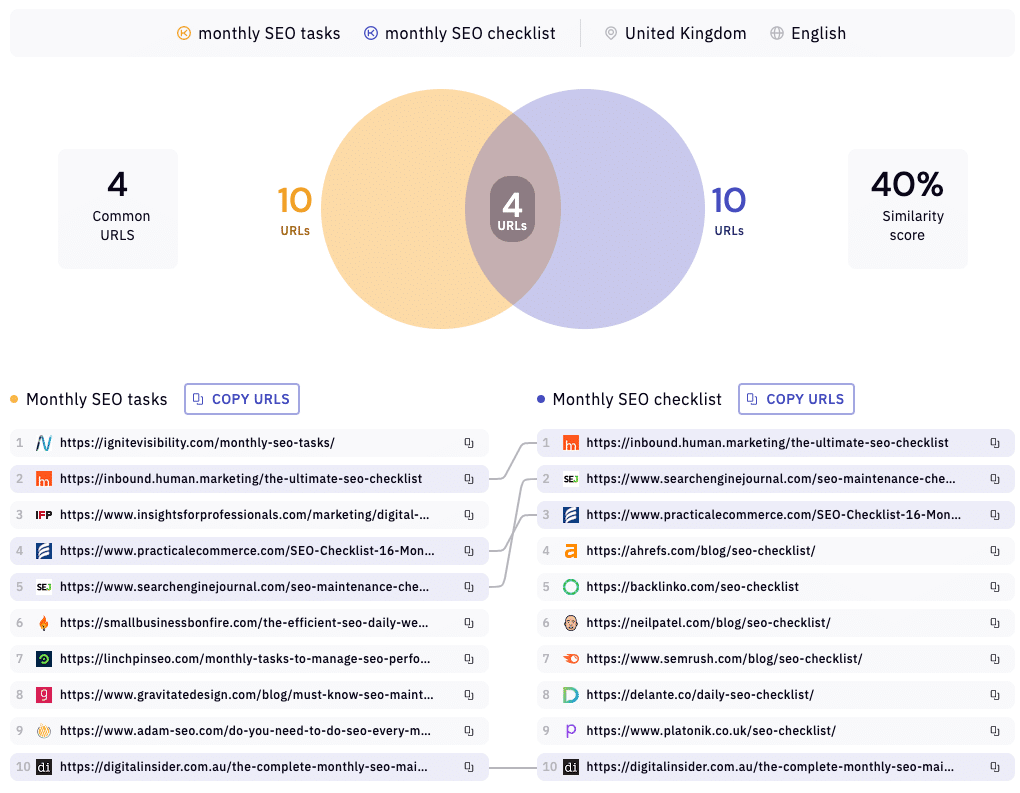
When I need to do bulk SERP similarity, I use keyword clustering.
A similar SERP similarity tool exists within Ahrefs, but only on a higher monthly price plan than the one I’m on.
Who should use it?
Ideal for those with any SEO experience who’s ever had a nagging doubt about a few similar keywords is the ideal user of the tool.
3. Frase.io for SERP analysis
Get detailed summaries and insights into top search results
Create briefs and content drafts to compete against top pages
Use to optimise content
What is Frase’s SERP analysis tool?
Frase.io offers SERP analysis, which enables you to examine the highest ranking search engine results for a query so you can understand the content structure of these pages and create tailored content to target that query.
How I use it
Ahrefs will show you SERP data such as the top pages, search volume, estimated traffic, domain rating and referring domains.
However, with Frase, I see summaries and details of top pages in one view, including the page titles, headings, questions, data and content snippets.
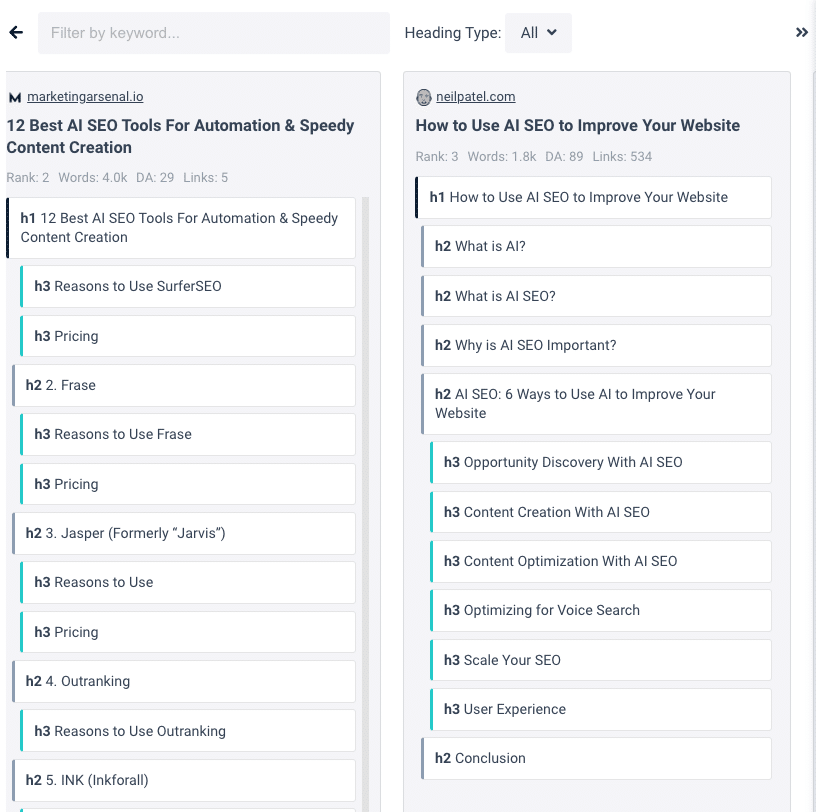
I can use this insight to create a brief or content draft and optimise content to compete against these top pages.
Who should use it?
Frase.io is aimed at the experienced SEO, content creator or digital marketer that manages or writes several pieces of SEO content each month.

4. ChatGPT for SEO content briefs
Quickly create a brief for you or a writer
Use with other ChatGPT prompts to draft copy
Save as a template and re-use
What is it?
An SEO content brief is a short document outlining the details and objective of a piece of content to be written, including the target keyword, audience, keyword intent, page title, headings, and conclusion.
How I use it
Before writing anything, I use the brief template below in conjunction with manual SERP and intent analysis.
Below is the prompt you can copy and paste into ChatGPT and try it out yourself.
Write a detailed SEO content brief for this keyword: x

Include the user intent, suggested page title, an introduction using the PAS copywriting format of around 70 words starting with the keyword, suggested actionable headings and subheadings and a conclusion.
Who should use it?
Anyone writing content or managing writers should be using an SEO brief.

5. ChatGPT for content writing
Construct SEO briefs, how-to guides, listicles and service pages
Create page titles, introductions, and answers to questions
Rewrite or paraphrase content to communicate more clearly
What is ChatGPT?
ChatGPT is a language processing model that can generate human-like text, perform translation summaries, and answer questions to prompts you give it.
How I use it
Using ChatGPT prompts and templates, I can generate SEO content briefs, construct how to guides, listicles and sales pages, and create page titles, introductions, answers to questions, and rewrite content for better search engine results.
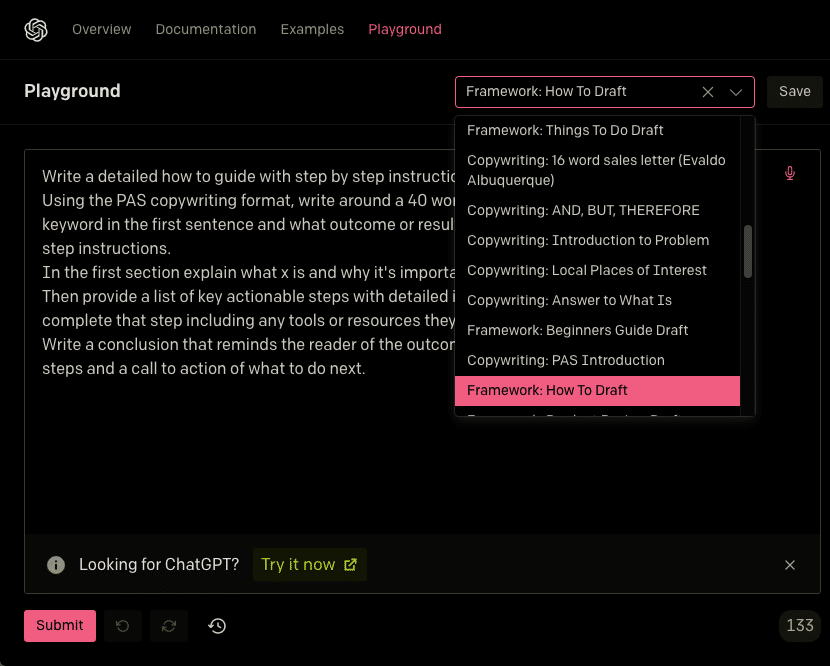
Read my article highlighting my first experiences with ChatGPT and the content I produced.
Bottom line: ChatGPT is better at writing SEO content and copy than me; I tell it what to write, then re-arrange it and edit it to construct a completed article or page.
Who should use it?
You’re already one of the millions using ChatGPT, aren’t you?

6. Grammarly for spelling, grammar & plagiarism
Grammar, spelling and punctuation checking
Corrections and suggestions to improve writing
Plagiarism checking to ensure originality
What is it?
Grammarly is a tool that catches grammar, spelling and punctuation errors as you type, provides corrections, and generates a comprehensive report on issues after each document.
How I use it
The paid version I use costs around £45 every three months and comes with spelling and grammar suggestions and a plagiarism checker, which is essential for the content I create for me and my clients.
I disable the writing suggestions until I’m finished with the draft, then turn them back on and make the changes.
After I read the article aloud a few times, I copy and paste it into Grammarly to check for plagiarism.
Who should use it?
Grammarly is for anyone who does any writing or SEO.

7. Databox for SEO reporting
Easily create customised reporting dashboards
Connect with popular data sources
Save time by quickly generating reports
What is Databox?
Databox provides business dashboards by connecting with popular data sources such as Google Search Console, Google Analytics, Hubspot, Shopify etc., to share reports and provide insights and trends.
How I use it
I give clients a link to an SEO reporting dashboard that shows their organic search traffic, rankings and other key metrics.
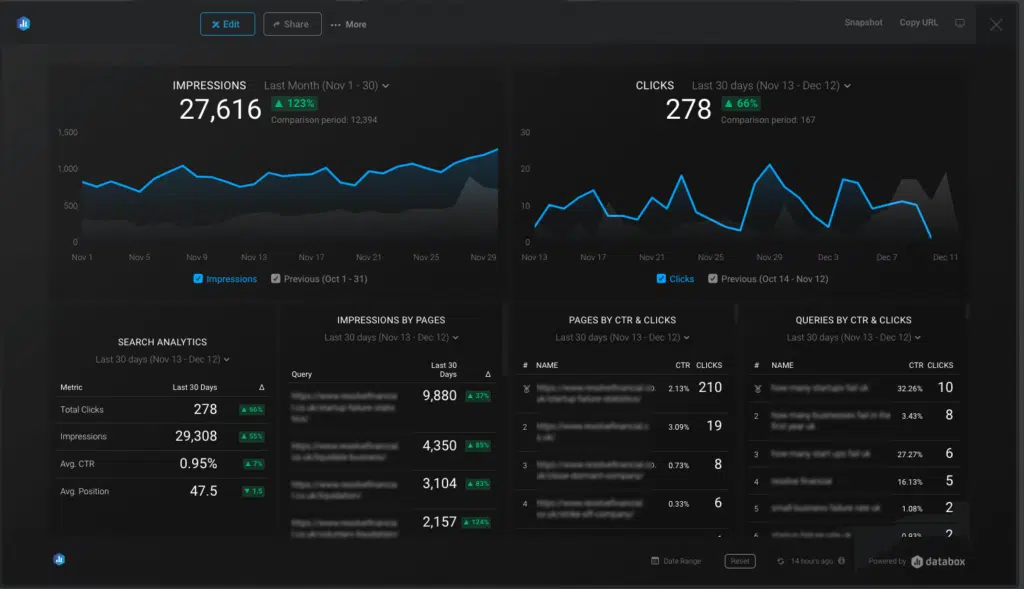
Follow these steps to connect Databox with Google Search Console to create an organic traffic dashboard.
- Log into your Databox account and navigate to the “Data Boards” tab.
- Click “Create New Databoard.
- Select “Use Wizard”.
- Click the “Google Search Console” box, then the “Continue” button.
- Click “Select Metrics”.
- Click the boxes showing the metrics you want to appear in your report, e.g., Clicks, Impressions, Impressions by Pages, Pages by CTR & Clicks, Queries by CTR & Clicks, Search Analytics and press “Continue.”
- Follow the instructions to connect to Google Search Console.
- Select your site and press “Activate.”
- And “voila”, your dashboard and report are created.
- You can customise the dashboard.
- Press copy URL, paste it into your browser and select CMD + D to add as a browser favourite or share it with clients or colleagues.
My SEO dashboard save a few hours each month.
Who should use it?
Ideal for a web designer, small agency or digital marketer to provide to clients.

8. Ahrefs for keyword ranking updates
Track keyword rankings for SEO purposes
Create new projects and specify keywords to track
Get email alerts on how pages are performing
What is it?
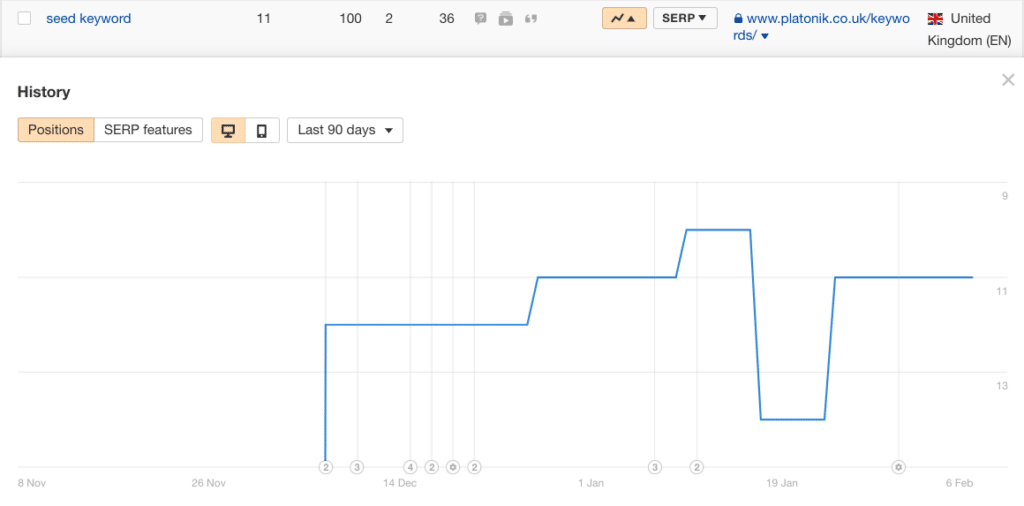
As an SEO, when I publish or update a new post, I want to see and track how it ranks for the keyword I’m targeting, and I can do that within my paid Ahrefs account.
How I use it
Just follow these steps to set up keyword ranking in Ahrefs:
- Go to “Rank Tracker” inside Ahrefs.
- Create a new project, specify the website and keywords to track.
- Set the tracking frequency and location for each keyword.
- Turn the email alerts on, and I’ll get updates on how my page is performing.
Who should use it?
For anyone running or managing a website looking for better search results.
9. Frase for content refreshes and updates
Boost search engine rankings and click growth
Easily find decaying pages or queries
Rewrite content to serve a shift in user intent
What is a content refresh?
A content refresh is when existing content on a web page is updated with fresher content, usually when user intent has changed over time, to improve its search engine rankings.
95% of new web pages never rank on page 1 within a year, so a content refresh can boost rankings and click growth by providing fresher content to reflect a shift in user intent.
For example, this page used to rank well for its target keyword, but AI is evolving so quickly that my original page content wasn’t as relevant as newer, competing pages.
How I use it
It’s easier to find decaying pages or queries with Frase SEO tools than Google Search Console; here’s how.
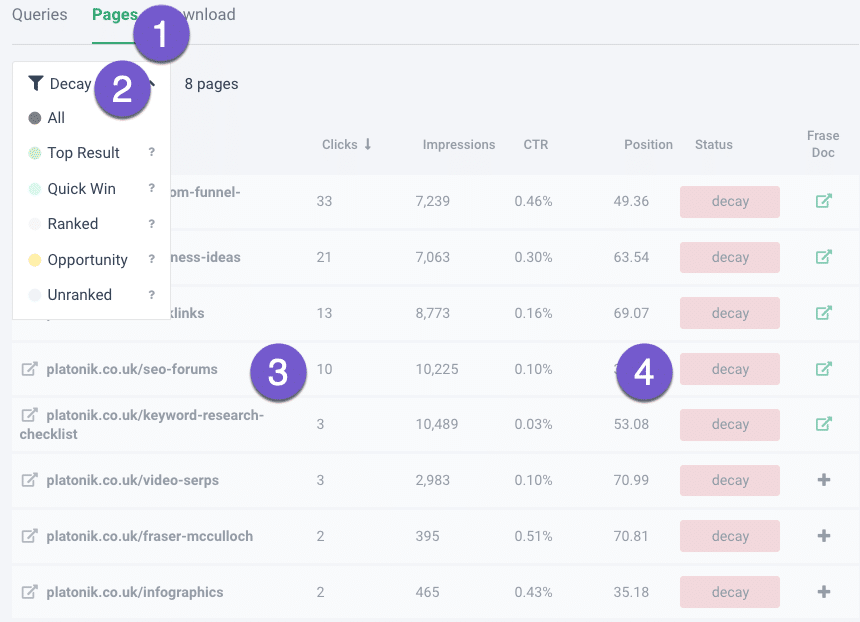
- Select SEO Tools
- GSC Content Analytics
- Select your site
- Select the Decay option from the Pages dropdown.
- Choose and click a page
- Decide the keyword you want to target
- Click the Frase Doc + button
- Then go into the document, analyse the SERP and rewrite to serve the intent.
Who should use it?
For people who take organic search traffic results seriously.

10. Ahrefs for SEO audits
404 errors notifications
Identify internal link opportunities
Keep an eye on sites for opportunities
What is it?
I have set up Ahrefs’ Site Audit tool to periodically audit and evaluate websites I look after to identify any issues and areas of improvement.
How I use it
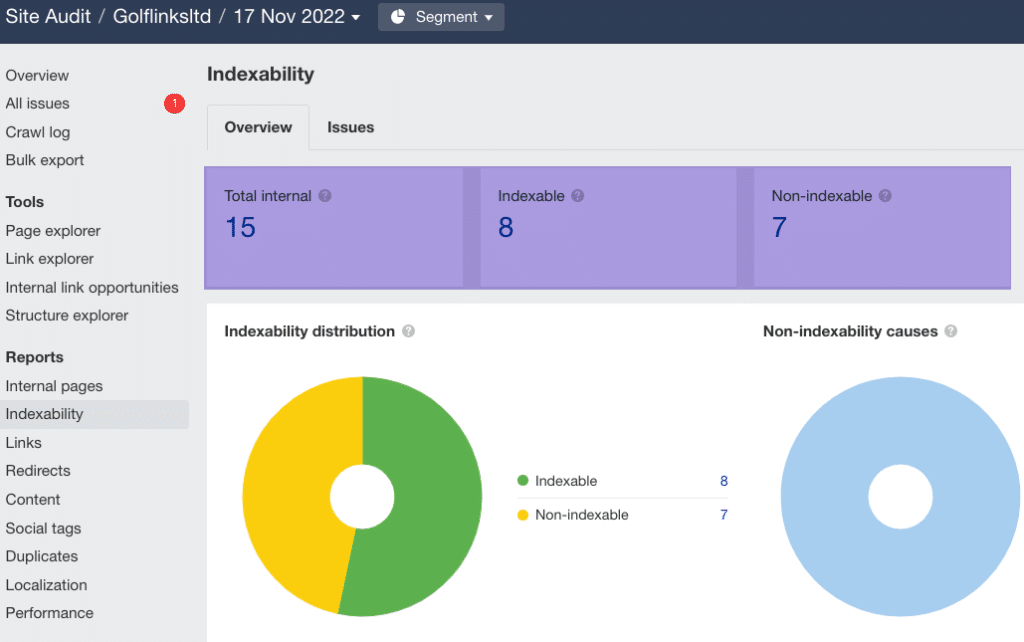
For starters, the site audit tool is free of charge to use, provided you can verify the site through Google Search Console, but more importantly, I like several audit features including:
In this example, nearly half the pages aren’t indexed; if a page isn’t indexed, it will never rank or get traffic.
Who should use it?
Every SEO, web designer and developer should use Ahrefs’ Site Audit tool to keep an eye on the sites they manage and leverage opportunities for their client and themselves.

11. Reword.co – AI tool to keep an eye on
Cheaper than hiring an editor
Use AI to write, shorten or expand text
Easily export copy to your CMS
What is it?
Reword.co is a brand new AI tool that appears to be positioning itself as a content editor.
“Write articles that perform with an editor that thinks.”
How I use it
I connected the tool with my Google Search Console account, and it pulled the content from most of my pages.
Select a page, then on the right menu, click Ask a Question, then choose:
- What other page titles would work?
- What headings matter most to readers?
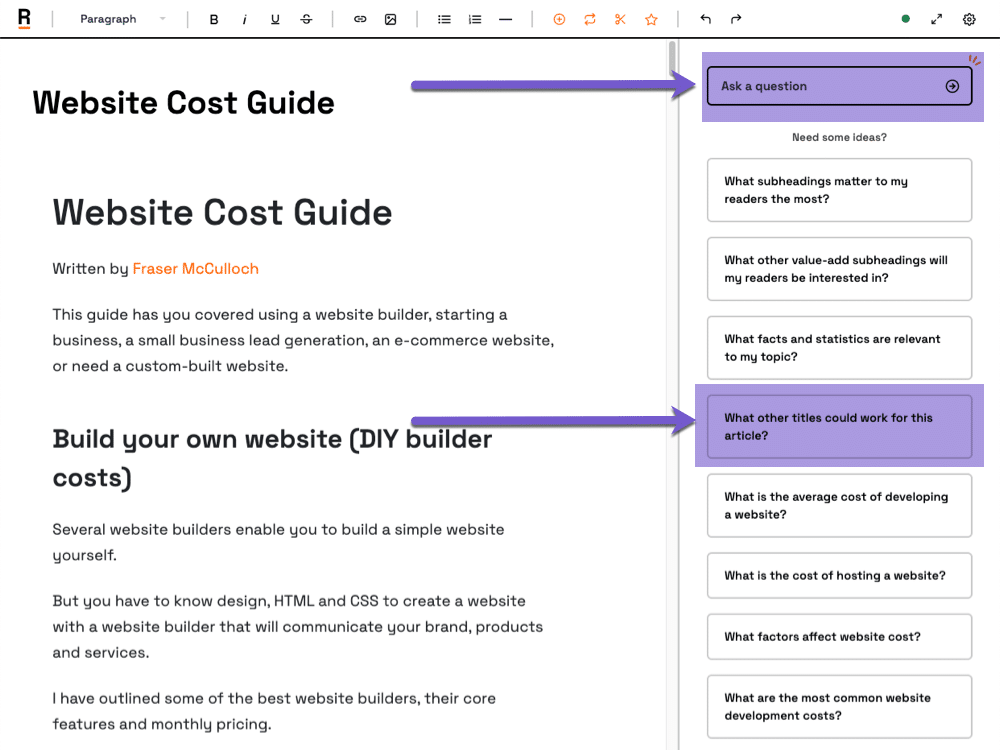
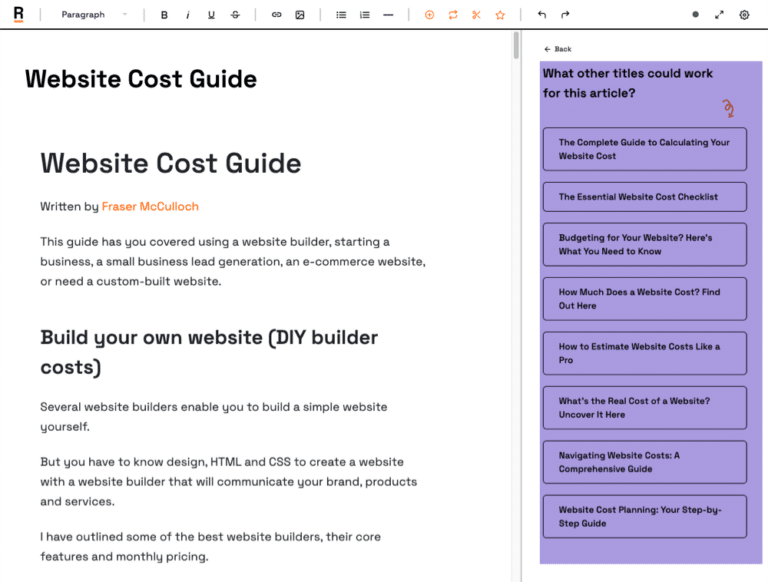
For example, I was given a few page title suggestions, selected the one I liked, and updated my document.
Then I selected what headings matter most to readers.
It added the heading to the document.
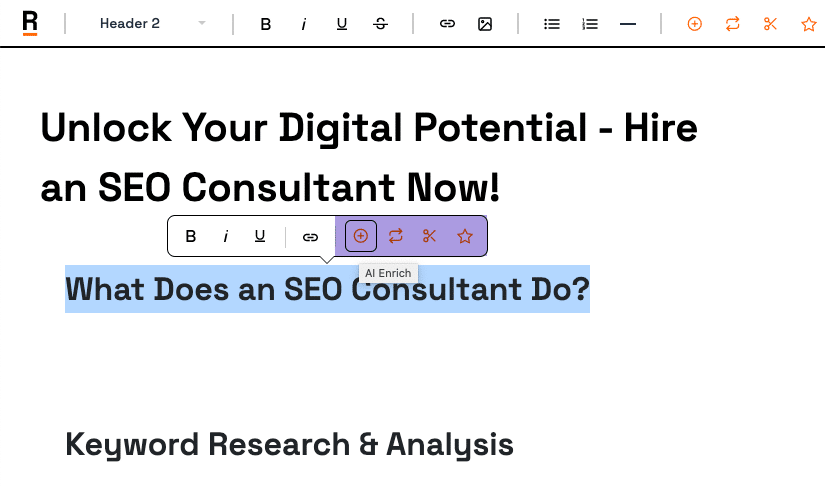
From here, I highlighted that heading, selected AI enrich from the toolbar, and it wrote relevant content underneath the heading; in this case, an answer to the question.
Creating a draft
I decided to write a draft article targeting “hire seo consultant“
Somehow the tool knew the headings I should include; so I added them.
Then selected each heading and it automatically wrote over 1000 words in a couple of minutes.
It even added internal links to a couple of my pages; although not the links I’d add.
Once the draft was written, it suggested a page title for me, then some statistics about average SEO costs.
I copied the content into Frase to review the topic score (content relevancy); 48% compared to 74% (average competitor score).
Promising tool, but lacks a topic scoring tool and would require me to completely change my writing workflow.
The AI writing features are very similar to Frase.
It’s early days for this tool, I doubt it can replace an industry experienced editor, but it forces you to think about the headings and copy you should include.
Who should use it?
Content and copywriters should keep an eye on this tool.